Overall Project
The purpose of this Logic App is to ingest the data from IT Glue by utilizing the API to grab the data and throw it into a Log Analytics Workspace to query.
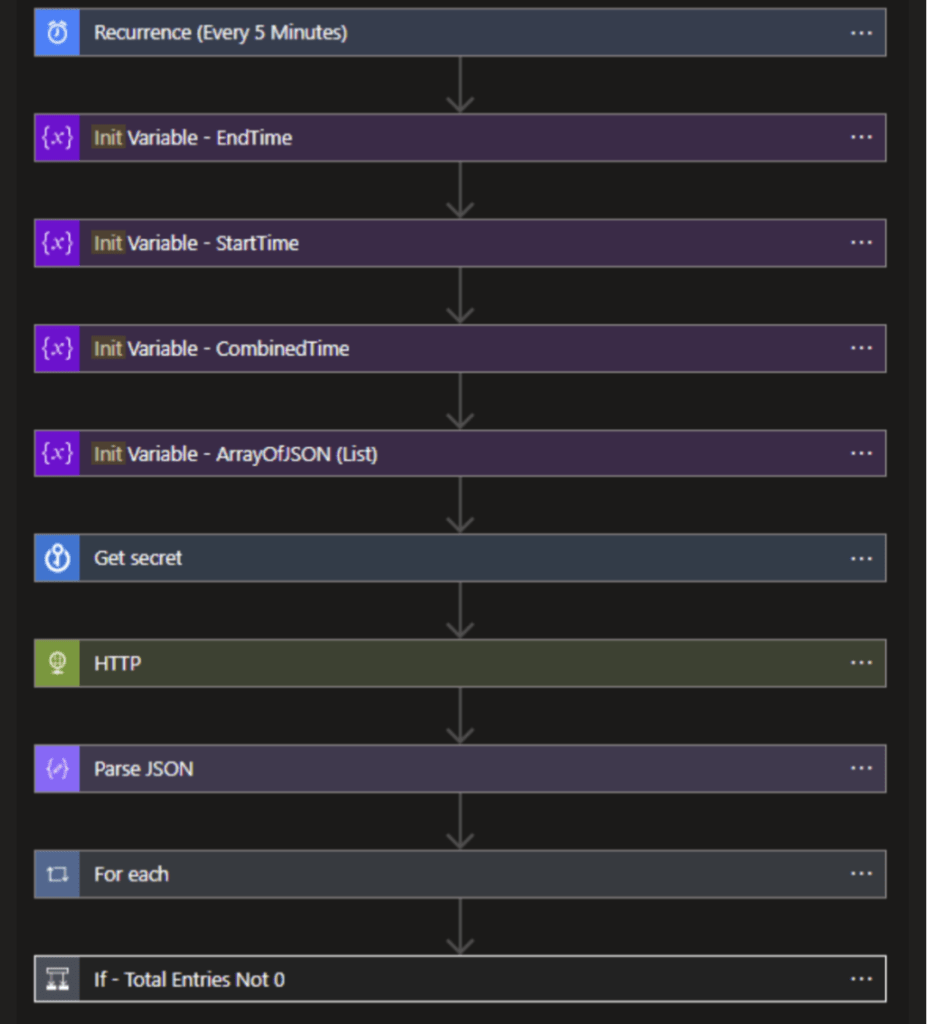
Process
The above screenshot shows the overall flow of the Logic App. The flow of the project goes as follows:
- Recurrence that occurs and checks every 5 minutes
- Initialize variables to be used.
- Grab the API Key from the Key Vault
- Send a HTTP request and then get the response back.
- Parse the JSON response.
- Throw into a list object.
- SendData to a table.
Variables Used
- Variable 1: This variable specifies the start time for data from IT Glue’s API. The value of this variable is determined by subtracting the recurrence interval from the current time.
- Variable 2: This variable specifies the end time for retrieving data from IT Glue’s API. The value of this variable is the current time.
- Variable 3: This variable specifies the time zone for retrieving data from IT Glue’s API. The value of this variable is the time zone of the IT Glue account.
- Variable 4: This variable creates an empty array that will be used to store the retrieved data from IT Glue’s API.
Key Vault
For this project, I utilized using Azure Key Vault to store and grab the secret API Key from. If the key ever gets recycled via ITGlues portal, I will only need to change via Azure Key Vault.
IT Glue API Request and Response
When initially testing this, the rest API had to include a couple of different parameters as part of the queries to grab the data that was desired.
Some of the parameters that were used are the following:
- Filter[created_at] – this allowed me to select the time frame that I wanted to search for data. From the above listed variables, I build a time frame by using Logic Apps functions by getting the current time frame, subtracting 5 minutes, and then making it into a string to be passed in here.
- Page[size] – this specifies how big the page size can be. I have bumped this up to 1,000 as this would be enough to grab the data and ingest it into Log Analytics.
- Note : The max page size a page can be is 1,000 line items and there is a max number of pages at 5. Any time frame larger than 1,000 line items will require additional pages and additional queries for that information.
SendData Connector
Once the data has been gone through via the JSON, it loops through and adds to the list to build the columns. We specify this list to send the data into a table called ITGlue_cl.

 Johnathon Kelley's Portfolio